BelajarLearning
How to Write a PRISMA Systematic Literature Review on [ ]How to Write a PRISMA Systematic Literature Review on [ ]
This guide takes you from an empty folder to a submitted systematic literature review (SLR) in 12 steps. Replace every [ ] with your own topic, population or field. The steps follow PRISMA 2020 and the three stages of Kitchenham and Charters (planning, conducting, reporting).This guide takes you from an empty folder to a submitted systematic literature review (SLR) in 12 steps. Replace every [ ] with your own topic, population or field. The steps follow PRISMA 2020 and the three stages of Kitchenham and Charters (planning, conducting, reporting).
How to Write a PRISMA Systematic Literature Review on [ ]
This guide takes you from an empty folder to a submitted systematic literature review (SLR) in 12 steps. Replace every [ ] with your own topic, population or field. The steps follow PRISMA 2020 and the three stages of Kitchenham and Charters (planning, conducting, reporting).
Before you start
An SLR answers set research questions by searching databases with a fixed string, screening the results against written rules, and coding what the included studies report. Anyone who repeats your search and rules should get the same studies. That is what makes it publishable.
What you need:
- Access to Web of Science (WoS) Core Collection and Scopus through your university library
- A reference manager such as Zotero or Mendeley
- Excel or Google Sheets for screening and coding
- A second reviewer (supervisor or colleague) to check part of the screening
- About 8 to 12 weeks for a review of 20 to 60 included studies
| Week | Work |
|---|---|
| 1 | Topic, gap check, research questions |
| 2 | Protocol, criteria, search strings |
| 3 | Run searches, export, remove duplicates |
| 4–5 | Title and abstract screening |
| 6–7 | Full-text retrieval and eligibility |
| 8–9 | Data extraction and coding |
| 10–11 | Writing, tables, figures |
| 12 | Formatting and final checks |
Keep one folder for the whole project, with subfolders for exports, screening, PDFs, figures and drafts. Save every export with the date in the file name. You will need these dates in the Methods section.
Step 1: Define the topic and prove the gap
Write your topic as one sentence with three parts: the method, the outcome and the population. Example pattern: "The use of [method, e.g., machine learning] to [outcome, e.g., predict ___] among [population, e.g., secondary school leavers]."
- Search Google Scholar, WoS and Scopus for existing reviews: [your topic] AND (review OR "systematic review" OR "meta-analysis").
- List the 4 to 6 closest reviews in a table: authors, year, number of studies, years covered, what they did not cover.
- Write your gap in one sentence: "Existing reviews cover [A] and [B], but no review has examined [ ] as a distinct task."
- If a review on exactly your topic appeared in the last 2 to 3 years, narrow your scope (a different population, outcome or decision point) or change the angle (fairness, explainability, deployment).
The gap must be about your own PhD or project area. Reviewers notice when an SLR is a general survey with a topic word added. A narrow, well-defined scope is easier to publish than a broad one.
This table of close reviews later becomes your Related Work section, so record each review's main strength and its main limitation now.
Step 2: Write the research questions
Use five or six research questions (RQs). Each RQ must be answerable from what the included papers report, and each one later becomes a Results subsection. This set works for most method-focused reviews:
| RQ | Question template | What you will code |
|---|---|---|
| RQ1 | What publication trends and settings characterise research on [ ]? | Year, country of the data, setting or decision point |
| RQ2 | Which data sources and features are used in [ ]? | Sample size, data source, feature types |
| RQ3 | Which methods or models are used for [ ]? | Approach, model family, best model |
| RQ4 | How are [ ] models or interventions evaluated? | Metrics, validation design, class imbalance |
| RQ5 | How do studies address [fairness / explainability / deployment / ethics]? | Yes or no plus the method used |
| RQ6 | What limitations do the studies report, and what future directions follow? | Author-stated limitations, grouped into themes |
Under each RQ, add one sentence saying what it covers. Keep the wording identical everywhere it appears (Introduction, Methods, Results, Conclusion).
Step 3: Fix the protocol before searching
Decide these rules first and write them down. Changing them after you see the results is the most common reason reviewers reject an SLR.
- Databases: WoS Core Collection and Scopus. Two databases is the usual minimum for a Q1 journal.
- Timeframe: for example 2015 to 2025. State why (the method became common, or a previous review ended there).
- Document type and language: peer-reviewed journal articles in English.
- Other sources: known key papers that the string misses can be added as "other methods" in PRISMA, but you must report them separately.
Write the inclusion and exclusion criteria as a two-column table. Each exclusion reason gets a short code that you will use during screening:
| Included if the study | Excluded if the study (code) |
|---|---|
| Addresses [ ] as its main outcome | Addresses a different outcome (E1 off-topic) |
| Trains and evaluates a [method] on real data | Uses only descriptive statistics or simulated data (E2 no model) |
| Studies [population] | Studies a different population (E3 population) |
| Is a peer-reviewed journal article in English, [year] to [year] | Is a review, conference paper, or outside the timeframe (E4 type/time) |
Register the protocol on OSF (osf.io, free) before screening and keep the registration ID for the Methods section.
Step 4: Build the Boolean search strings
Split your topic into three concept groups. Put synonyms inside each group with OR, then join the groups with AND.
| Group | Example terms (replace with yours) |
|---|---|
| A: Method | "machine learning" OR "deep learning" OR "data mining" OR "random forest" OR [ ] |
| B: Outcome | "[outcome 1]" OR "[outcome 2]" OR "[outcome 3]" OR [ ] |
| C: Population | student* OR pupil* OR learner* OR "[population]" OR [ ] |
Web of Science (Advanced Search):
TS=("machine learning" OR "deep learning" OR [ ]) AND TS=("[outcome 1]" OR "[outcome 2]" OR [ ]) AND TS=(student* OR "[population]" OR [ ]) AND PY=(2015-2025) AND DT=(Article) AND LA=(English)
Scopus (Advanced document search):
TITLE-ABS-KEY(("machine learning" OR "deep learning" OR [ ]) AND ("[outcome 1]" OR "[outcome 2]" OR [ ]) AND (student* OR "[population]" OR [ ])) AND PUBYEAR > 2014 AND PUBYEAR < 2026 AND (LIMIT-TO(DOCTYPE,"ar")) AND (LIMIT-TO(LANGUAGE,"English"))
Tips that save time:
- In WoS, paste the string straight into the Query Preview box and click Search. Do not use the "Add to query" button, because it wraps everything in ALL=( ) and gives "Invalid query".
- Keep the string on one line. Do not put a wildcard (*) inside quotation marks.
- Test the string: at least 3 to 5 papers you already know should appear. If one is missing, find the word it uses and add that word.
- If you get thousands of hits, make group B more specific. If you get under 50, add synonyms.
Step 5: Run the searches and export everything
- Run both searches on the same day. Write down the date, the exact string and the number of hits for each database.
- Take a screenshot of each search history page. Reviewers sometimes ask for it.
- Export from WoS: Export, then Excel (or RIS), Record content: "Full record". WoS exports 1,000 records per batch, so export in batches if needed.
- Export from Scopus: Export, then CSV, and tick all fields, including abstract, keywords, affiliations and DOI.
- Check the WoS export covers your full timeframe. Some university subscriptions only cover recent years. If yours does, state it as a limitation.
Save the exports as, for example, WoS_2026-10-28_294.xls and Scopus_2026-10-28_126.csv (database, date, count). Never edit these files. Work on copies.
Step 6: Remove duplicates and screen titles and abstracts
Duplicates. Combine both exports in one sheet with the same columns: ID, source, authors, year, title, journal, DOI, abstract, keywords. Match by DOI first, then by title in lower case with punctuation removed. Keep the record with more complete data. Count what you removed (this number goes in PRISMA).
Screening sheet. Add these columns: Decision (Include / Exclude / Maybe), Reason code (E1 to E4), Reviewer, Note.
- Read the title and abstract of every record and decide using only the Step 3 criteria.
- When in doubt, choose Maybe. Maybe records go to full-text reading.
- The second reviewer screens a random 20% (or all records, if time allows). Calculate Cohen's kappa on that overlap. A kappa of 0.6 or higher is acceptable; report the actual value.
- Resolve disagreements by discussion, with the supervisor as tiebreaker. Write this rule in Methods.
- Count the excluded records by reason code. These counts go in the PRISMA box "Records excluded".
Screen against the criteria, not against how interesting a paper is. If you change a rule halfway, re-screen everything already done with the new rule and report the change.
Step 7: Retrieve full texts and assess eligibility
- Give every record that passed screening a study ID (S001, S002 ...) and save its PDF as S001_Author_Year.pdf.
- Get PDFs through the library, the publisher, Google Scholar, ResearchGate, or by emailing the authors. Track which ones you cannot get. They go in the PRISMA box "Reports not retrieved".
- Read each full text against the same criteria. Record one main exclusion reason per excluded paper (for example: outcome not [ ], no trained model, simulated data only).
- Do the same for papers found through other methods (citation chasing, known papers) and keep their counts separate.
At the end you have four numbers per column of PRISMA: sought, not retrieved, assessed, excluded (with reasons). Included = assessed minus excluded. Check that the arithmetic adds up before you move on.
Step 8: Extract and code the data
Build one row per included study. Each column links to an RQ, so the Results section can be written straight from this sheet.
| Column | RQ | How to fill it |
|---|---|---|
| Study ID, authors, year, journal, DOI | — | Copy from the export |
| Country of the data | RQ1 | Where the data came from, not the author's affiliation |
| Setting or decision point | RQ1 | One category from a fixed list you define |
| Outcome predicted | RQ1 | Short phrase, e.g., [ ] |
| Sample size, data source | RQ2 | Number + source, or "not stated" |
| Feature types | RQ2 | Tick boxes: academic, demographic, psychological, behavioural, other |
| Approach | RQ3 | Classification / regression / recommendation / other |
| Model family, best model | RQ3 | Fixed list (e.g., ensemble, classical, deep learning, rule-based) |
| Metrics, validation | RQ4 | Accuracy only? F1? AUC? Cross-validation? External validation? |
| Class imbalance strategy | RQ4 | Yes/no + method |
| Fairness, explainability, deployment | RQ5 | Yes/no + method for each |
| Limitations (author-stated) | RQ6 | Copy short phrases, then group into themes |
| Reported result | — | Best result as the authors report it |
Rules:
- Code only what the paper states. If it is not reported, write "not stated"; never guess.
- Define each category before coding and keep the definitions in a codebook tab.
- The second reviewer codes 20% of the studies independently; report agreement.
- Count each category with a formula (COUNTIF) so the numbers in the text, tables and figures always match.
Step 9: Make the PRISMA diagram, tables and figures
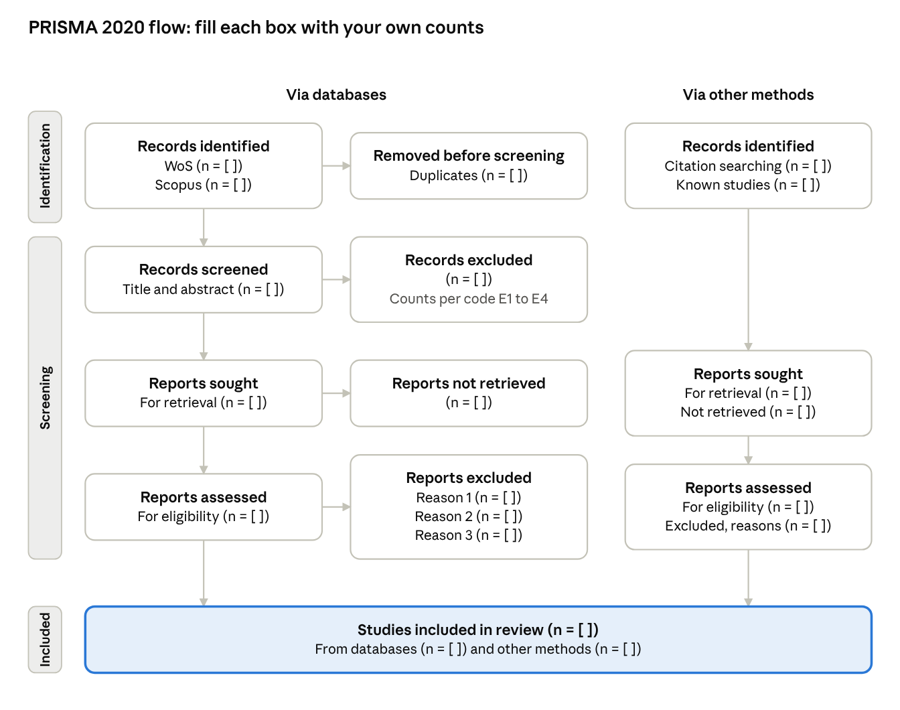
Use the PRISMA 2020 flow diagram with two columns: "Identification of studies via databases" on the left and "via other methods" on the right. Fill every box with your own counts from Steps 5 to 7. Download the official template at prisma-statement.org.
PRISMA 2020 flow template · two columns, blank counts
Each box going down equals the box above minus the box to its right; the bottom box adds both columns.
Check that each box equals the box above it minus what was removed. Reviewers check this arithmetic first.
Tables most SLRs need:
- Inclusion and exclusion criteria (from Step 3)
- One table per categorical RQ (for example: settings, model families, evaluation practices, limitation themes), each with columns Category | Description | f | %
- Appendix table of all included studies: study, data, setting, outcome, sample, best model, reported result
Figures most SLRs need: the PRISMA diagram, studies by year, studies by country, and one bar chart per main category. Use one or two colours, label the axes, and export at 300 dpi. Every table and figure must be mentioned in the text before it appears.
Step 10: Write the article section by section
Write in this order: Methods, Results, Related Work, Introduction, Discussion and Conclusion, Abstract. Methods and Results come from your sheets, so they are the easiest to start with. The Abstract is written last because it summarises the numbers.
| Section | What goes in | Length |
|---|---|---|
| Title | "Systematic Review of [method] for [ ]: [the angles you cover]" | — |
| Abstract | Problem, gap, method (databases, years, PRISMA), number included, 4 to 6 key findings with numbers, one-line conclusion | 150–250 words (check the journal) |
| \1. Introduction | Why [ ] matters, why it differs from related tasks, the gap, the RQs, the contribution | 600–900 words |
| \2. Related Work | The 4 to 6 closest reviews: what each covered, its strength, then its limitation; end with the gap | 500–800 words |
| \3. Methods | Planning (protocol, databases, strings, criteria), conducting (screening, kappa, extraction), reporting (synthesis) + PRISMA figure | 900–1,300 words |
| \4. Results and Discussion | One subsection per RQ: the numbers first, then what they mean and how they compare with other work | 2,500–3,500 words |
| \5. Limitations | Limits of YOUR review: databases, timeframe, language, missing PDFs, no quality appraisal | 200–350 words |
| \6. Conclusion | Answer each RQ in a sentence, then the main gaps and directions | 250–400 words |
Writing rules that reviewers notice:
- Every number in the text must match the tables, the figures and the abstract.
- Report a count with its percentage once: "14 studies (48.3%)". Use the same N throughout.
- Describe each cited study with a limitation, not only a summary: "X used ..., but did not ...".
- Write plainly. Avoid filler words such as "delve", "pivotal", "landscape" and "plays a crucial role".
- Never invent a number you have not counted. Leave a visible placeholder such as [kappa = __] until you have it.
Step 11: Choose a journal and format for it
A journal with no article processing charge (APC) is either diamond open access (free to read and publish) or a subscription journal where you choose the standard, non-open-access route. Check two things before choosing: the current quartile for your subject area at scimagojr.com, and whether the journal publishes SLRs (look for reviews in recent issues).
Journals to check for education and learning analytics topics (confirm the quartile and fees yourself, as they change):
| Journal | Route with no APC | Notes |
|---|---|---|
| Journal of Learning Analytics (SoLAR) | Diamond open access | Up to 9,000 words; APA 7; Word template jla18_final.dotx; Notes for Practice box required |
| Journal of Educational Data Mining | Diamond open access | Good fit for prediction and modelling reviews |
| Computers & Education | Subscription route | Very selective; strong for SLRs |
| British Journal of Educational Technology | Subscription route | Accepts systematic reviews |
| Education and Information Technologies | Subscription route | Wide scope, faster decisions |
| International Journal of Artificial Intelligence in Education | Subscription route | Strong for AI and fairness angles |
Once chosen:
- Download the journal's template and author guidelines. Note the word limit, the abstract limit, the reference style and the required sections.
- Move your text into the template using its own styles. Do not copy formatting from another journal.
- Convert the citation style (for example, from numbered [1] to APA author–year) with Zotero or Mendeley, then check every entry has a DOI.
- Add the journal-specific parts: highlights, Notes for Practice, conflict of interest, funding, data availability, author ORCIDs.
- Save figures as separate high-resolution files if the journal asks for them.
- Write a short cover letter: the gap, the contribution and why the paper fits this journal's readers.
Step 12: Final checks before you submit
- ☐ The PRISMA counts add up, box by box, and match the Methods text
- ☐ The number of included studies is the same in the Abstract, Methods, Results, Conclusion and Appendix
- ☐ Every count and percentage in the text matches its table or figure
- ☐ The RQs are worded the same everywhere
- ☐ Search date, strings, databases and timeframe are stated in full
- ☐ Kappa (or percentage agreement) and the OSF registration ID are reported
- ☐ Every in-text citation is in the reference list, and every reference is cited
- ☐ Every reference has a DOI where one exists
- ☐ All placeholders such as [ ] and [__] are filled or removed
- ☐ Word count is within the journal limit, including references if the journal counts them
- ☐ The PRISMA 2020 checklist is filled in and uploaded as a supplementary file
- ☐ The screening sheet and extraction matrix are uploaded as Supplementary Table S1
Common mistakes that lead to rejection:
| Mistake | Fix |
|---|---|
| Only one database searched | Use at least WoS and Scopus |
| Criteria changed after screening | Fix them in the protocol; re-screen if they change |
| Results are a list of paper summaries | Synthesise by RQ with counts, then compare |
| No gap stated, or the gap is already covered by a recent review | Show the close reviews in Related Work and what they missed |
| Numbers do not match across sections | Count with formulas from one master sheet |
| Limitations of the review are missing | Add a short Limitations section about your own method |
| Papers known to the field are missing | Test the string with known papers in Step 4 |
Aliran kerja: Menulis artikel SLR dengan bantuan AI
- Kumpul artikel contoh. Pilih 10 artikel SLR yang diterbitkan dalam jurnal Q1 dalam bidang anda. Muat naik kesemuanya ke Google NotebookLM (Gemini).
- Analisis ciri-ciri artikel. Tulis prompt yang meminta NotebookLM mengenal pasti ciri-ciri yang sama dalam kesemua artikel tersebut: struktur bahagian, bentuk soalan kajian, kaedah PRISMA, jenis jadual dan rajah, gaya penulisan dan panjang setiap bahagian.
- Jana laporan. Minta NotebookLM menghasilkan laporan ringkas tentang ciri-ciri tersebut. Simpan laporan ini sebagai rujukan.
- Bina prompt penulisan. Berdasarkan laporan itu, minta NotebookLM menulis satu prompt lengkap untuk menghasilkan artikel SLR yang mengikut ciri-ciri yang dikenal pasti. Prompt ini juga perlu mengandungi rentetan carian Boolean untuk topik [ ].
- Cari artikel dalam pangkalan data. Jalankan rentetan carian Boolean itu dalam Web of Science dan Scopus. Catat tarikh carian dan bilangan rekod. Eksport semua rekod dalam format Excel/RIS (WoS) dan CSV (Scopus).
- Saring dan muat turun artikel. Buang rekod pendua, kemudian saring tajuk dan abstrak mengikut kriteria inklusi dan eksklusi. Muat turun teks penuh bagi artikel yang lulus saringan. Catat bilangan pada setiap peringkat untuk rajah PRISMA.
- Susun fail. Letakkan semua fail dalam satu folder: fail eksport, helaian saringan, PDF artikel dan laporan dari Langkah 3.
- Jana draf dalam Claude. Buka Claude (Cowork), tambah folder tersebut, kemudian tampal prompt dari Langkah 4. Claude akan menghasilkan draf artikel berdasarkan data sebenar dalam folder itu.
- Tukar templat jurnal kepada skill. Muat turun templat dan garis panduan penulis dari jurnal yang dipilih. Muat naik ke Claude dan minta Claude menukarnya kepada skill.
- Panggil skill. Panggil skill tersebut (contohnya /nama-skill) dan muat naik draf artikel dari Langkah 8.
- Dapatkan artikel akhir. Claude akan memformat semula artikel mengikut templat jurnal: gaya bahagian, sitasi, jadual, rajah dan had perkataan.
Ai : 1.Gemini notebook 2.Claude Pro
English translation not available yet; showing the Malay text.
How to Write a PRISMA Systematic Literature Review on [ ]
This guide takes you from an empty folder to a submitted systematic literature review (SLR) in 12 steps. Replace every [ ] with your own topic, population or field. The steps follow PRISMA 2020 and the three stages of Kitchenham and Charters (planning, conducting, reporting).
Before you start
An SLR answers set research questions by searching databases with a fixed string, screening the results against written rules, and coding what the included studies report. Anyone who repeats your search and rules should get the same studies. That is what makes it publishable.
What you need:
- Access to Web of Science (WoS) Core Collection and Scopus through your university library
- A reference manager such as Zotero or Mendeley
- Excel or Google Sheets for screening and coding
- A second reviewer (supervisor or colleague) to check part of the screening
- About 8 to 12 weeks for a review of 20 to 60 included studies
| Week | Work |
|---|---|
| 1 | Topic, gap check, research questions |
| 2 | Protocol, criteria, search strings |
| 3 | Run searches, export, remove duplicates |
| 4–5 | Title and abstract screening |
| 6–7 | Full-text retrieval and eligibility |
| 8–9 | Data extraction and coding |
| 10–11 | Writing, tables, figures |
| 12 | Formatting and final checks |
Keep one folder for the whole project, with subfolders for exports, screening, PDFs, figures and drafts. Save every export with the date in the file name. You will need these dates in the Methods section.
Step 1: Define the topic and prove the gap
Write your topic as one sentence with three parts: the method, the outcome and the population. Example pattern: "The use of [method, e.g., machine learning] to [outcome, e.g., predict ___] among [population, e.g., secondary school leavers]."
- Search Google Scholar, WoS and Scopus for existing reviews: [your topic] AND (review OR "systematic review" OR "meta-analysis").
- List the 4 to 6 closest reviews in a table: authors, year, number of studies, years covered, what they did not cover.
- Write your gap in one sentence: "Existing reviews cover [A] and [B], but no review has examined [ ] as a distinct task."
- If a review on exactly your topic appeared in the last 2 to 3 years, narrow your scope (a different population, outcome or decision point) or change the angle (fairness, explainability, deployment).
The gap must be about your own PhD or project area. Reviewers notice when an SLR is a general survey with a topic word added. A narrow, well-defined scope is easier to publish than a broad one.
This table of close reviews later becomes your Related Work section, so record each review's main strength and its main limitation now.
Step 2: Write the research questions
Use five or six research questions (RQs). Each RQ must be answerable from what the included papers report, and each one later becomes a Results subsection. This set works for most method-focused reviews:
| RQ | Question template | What you will code |
|---|---|---|
| RQ1 | What publication trends and settings characterise research on [ ]? | Year, country of the data, setting or decision point |
| RQ2 | Which data sources and features are used in [ ]? | Sample size, data source, feature types |
| RQ3 | Which methods or models are used for [ ]? | Approach, model family, best model |
| RQ4 | How are [ ] models or interventions evaluated? | Metrics, validation design, class imbalance |
| RQ5 | How do studies address [fairness / explainability / deployment / ethics]? | Yes or no plus the method used |
| RQ6 | What limitations do the studies report, and what future directions follow? | Author-stated limitations, grouped into themes |
Under each RQ, add one sentence saying what it covers. Keep the wording identical everywhere it appears (Introduction, Methods, Results, Conclusion).
Step 3: Fix the protocol before searching
Decide these rules first and write them down. Changing them after you see the results is the most common reason reviewers reject an SLR.
- Databases: WoS Core Collection and Scopus. Two databases is the usual minimum for a Q1 journal.
- Timeframe: for example 2015 to 2025. State why (the method became common, or a previous review ended there).
- Document type and language: peer-reviewed journal articles in English.
- Other sources: known key papers that the string misses can be added as "other methods" in PRISMA, but you must report them separately.
Write the inclusion and exclusion criteria as a two-column table. Each exclusion reason gets a short code that you will use during screening:
| Included if the study | Excluded if the study (code) |
|---|---|
| Addresses [ ] as its main outcome | Addresses a different outcome (E1 off-topic) |
| Trains and evaluates a [method] on real data | Uses only descriptive statistics or simulated data (E2 no model) |
| Studies [population] | Studies a different population (E3 population) |
| Is a peer-reviewed journal article in English, [year] to [year] | Is a review, conference paper, or outside the timeframe (E4 type/time) |
Register the protocol on OSF (osf.io, free) before screening and keep the registration ID for the Methods section.
Step 4: Build the Boolean search strings
Split your topic into three concept groups. Put synonyms inside each group with OR, then join the groups with AND.
| Group | Example terms (replace with yours) |
|---|---|
| A: Method | "machine learning" OR "deep learning" OR "data mining" OR "random forest" OR [ ] |
| B: Outcome | "[outcome 1]" OR "[outcome 2]" OR "[outcome 3]" OR [ ] |
| C: Population | student* OR pupil* OR learner* OR "[population]" OR [ ] |
Web of Science (Advanced Search):
TS=("machine learning" OR "deep learning" OR [ ]) AND TS=("[outcome 1]" OR "[outcome 2]" OR [ ]) AND TS=(student* OR "[population]" OR [ ]) AND PY=(2015-2025) AND DT=(Article) AND LA=(English)
Scopus (Advanced document search):
TITLE-ABS-KEY(("machine learning" OR "deep learning" OR [ ]) AND ("[outcome 1]" OR "[outcome 2]" OR [ ]) AND (student* OR "[population]" OR [ ])) AND PUBYEAR > 2014 AND PUBYEAR < 2026 AND (LIMIT-TO(DOCTYPE,"ar")) AND (LIMIT-TO(LANGUAGE,"English"))
Tips that save time:
- In WoS, paste the string straight into the Query Preview box and click Search. Do not use the "Add to query" button, because it wraps everything in ALL=( ) and gives "Invalid query".
- Keep the string on one line. Do not put a wildcard (*) inside quotation marks.
- Test the string: at least 3 to 5 papers you already know should appear. If one is missing, find the word it uses and add that word.
- If you get thousands of hits, make group B more specific. If you get under 50, add synonyms.
Step 5: Run the searches and export everything
- Run both searches on the same day. Write down the date, the exact string and the number of hits for each database.
- Take a screenshot of each search history page. Reviewers sometimes ask for it.
- Export from WoS: Export, then Excel (or RIS), Record content: "Full record". WoS exports 1,000 records per batch, so export in batches if needed.
- Export from Scopus: Export, then CSV, and tick all fields, including abstract, keywords, affiliations and DOI.
- Check the WoS export covers your full timeframe. Some university subscriptions only cover recent years. If yours does, state it as a limitation.
Save the exports as, for example, WoS_2026-10-28_294.xls and Scopus_2026-10-28_126.csv (database, date, count). Never edit these files. Work on copies.
Step 6: Remove duplicates and screen titles and abstracts
Duplicates. Combine both exports in one sheet with the same columns: ID, source, authors, year, title, journal, DOI, abstract, keywords. Match by DOI first, then by title in lower case with punctuation removed. Keep the record with more complete data. Count what you removed (this number goes in PRISMA).
Screening sheet. Add these columns: Decision (Include / Exclude / Maybe), Reason code (E1 to E4), Reviewer, Note.
- Read the title and abstract of every record and decide using only the Step 3 criteria.
- When in doubt, choose Maybe. Maybe records go to full-text reading.
- The second reviewer screens a random 20% (or all records, if time allows). Calculate Cohen's kappa on that overlap. A kappa of 0.6 or higher is acceptable; report the actual value.
- Resolve disagreements by discussion, with the supervisor as tiebreaker. Write this rule in Methods.
- Count the excluded records by reason code. These counts go in the PRISMA box "Records excluded".
Screen against the criteria, not against how interesting a paper is. If you change a rule halfway, re-screen everything already done with the new rule and report the change.
Step 7: Retrieve full texts and assess eligibility
- Give every record that passed screening a study ID (S001, S002 ...) and save its PDF as S001_Author_Year.pdf.
- Get PDFs through the library, the publisher, Google Scholar, ResearchGate, or by emailing the authors. Track which ones you cannot get. They go in the PRISMA box "Reports not retrieved".
- Read each full text against the same criteria. Record one main exclusion reason per excluded paper (for example: outcome not [ ], no trained model, simulated data only).
- Do the same for papers found through other methods (citation chasing, known papers) and keep their counts separate.
At the end you have four numbers per column of PRISMA: sought, not retrieved, assessed, excluded (with reasons). Included = assessed minus excluded. Check that the arithmetic adds up before you move on.
Step 8: Extract and code the data
Build one row per included study. Each column links to an RQ, so the Results section can be written straight from this sheet.
| Column | RQ | How to fill it |
|---|---|---|
| Study ID, authors, year, journal, DOI | — | Copy from the export |
| Country of the data | RQ1 | Where the data came from, not the author's affiliation |
| Setting or decision point | RQ1 | One category from a fixed list you define |
| Outcome predicted | RQ1 | Short phrase, e.g., [ ] |
| Sample size, data source | RQ2 | Number + source, or "not stated" |
| Feature types | RQ2 | Tick boxes: academic, demographic, psychological, behavioural, other |
| Approach | RQ3 | Classification / regression / recommendation / other |
| Model family, best model | RQ3 | Fixed list (e.g., ensemble, classical, deep learning, rule-based) |
| Metrics, validation | RQ4 | Accuracy only? F1? AUC? Cross-validation? External validation? |
| Class imbalance strategy | RQ4 | Yes/no + method |
| Fairness, explainability, deployment | RQ5 | Yes/no + method for each |
| Limitations (author-stated) | RQ6 | Copy short phrases, then group into themes |
| Reported result | — | Best result as the authors report it |
Rules:
- Code only what the paper states. If it is not reported, write "not stated"; never guess.
- Define each category before coding and keep the definitions in a codebook tab.
- The second reviewer codes 20% of the studies independently; report agreement.
- Count each category with a formula (COUNTIF) so the numbers in the text, tables and figures always match.
Step 9: Make the PRISMA diagram, tables and figures
Use the PRISMA 2020 flow diagram with two columns: "Identification of studies via databases" on the left and "via other methods" on the right. Fill every box with your own counts from Steps 5 to 7. Download the official template at prisma-statement.org.
PRISMA 2020 flow template · two columns, blank counts
Each box going down equals the box above minus the box to its right; the bottom box adds both columns.
Check that each box equals the box above it minus what was removed. Reviewers check this arithmetic first.
Tables most SLRs need:
- Inclusion and exclusion criteria (from Step 3)
- One table per categorical RQ (for example: settings, model families, evaluation practices, limitation themes), each with columns Category | Description | f | %
- Appendix table of all included studies: study, data, setting, outcome, sample, best model, reported result
Figures most SLRs need: the PRISMA diagram, studies by year, studies by country, and one bar chart per main category. Use one or two colours, label the axes, and export at 300 dpi. Every table and figure must be mentioned in the text before it appears.
Step 10: Write the article section by section
Write in this order: Methods, Results, Related Work, Introduction, Discussion and Conclusion, Abstract. Methods and Results come from your sheets, so they are the easiest to start with. The Abstract is written last because it summarises the numbers.
| Section | What goes in | Length |
|---|---|---|
| Title | "Systematic Review of [method] for [ ]: [the angles you cover]" | — |
| Abstract | Problem, gap, method (databases, years, PRISMA), number included, 4 to 6 key findings with numbers, one-line conclusion | 150–250 words (check the journal) |
| \1. Introduction | Why [ ] matters, why it differs from related tasks, the gap, the RQs, the contribution | 600–900 words |
| \2. Related Work | The 4 to 6 closest reviews: what each covered, its strength, then its limitation; end with the gap | 500–800 words |
| \3. Methods | Planning (protocol, databases, strings, criteria), conducting (screening, kappa, extraction), reporting (synthesis) + PRISMA figure | 900–1,300 words |
| \4. Results and Discussion | One subsection per RQ: the numbers first, then what they mean and how they compare with other work | 2,500–3,500 words |
| \5. Limitations | Limits of YOUR review: databases, timeframe, language, missing PDFs, no quality appraisal | 200–350 words |
| \6. Conclusion | Answer each RQ in a sentence, then the main gaps and directions | 250–400 words |
Writing rules that reviewers notice:
- Every number in the text must match the tables, the figures and the abstract.
- Report a count with its percentage once: "14 studies (48.3%)". Use the same N throughout.
- Describe each cited study with a limitation, not only a summary: "X used ..., but did not ...".
- Write plainly. Avoid filler words such as "delve", "pivotal", "landscape" and "plays a crucial role".
- Never invent a number you have not counted. Leave a visible placeholder such as [kappa = __] until you have it.
Step 11: Choose a journal and format for it
A journal with no article processing charge (APC) is either diamond open access (free to read and publish) or a subscription journal where you choose the standard, non-open-access route. Check two things before choosing: the current quartile for your subject area at scimagojr.com, and whether the journal publishes SLRs (look for reviews in recent issues).
Journals to check for education and learning analytics topics (confirm the quartile and fees yourself, as they change):
| Journal | Route with no APC | Notes |
|---|---|---|
| Journal of Learning Analytics (SoLAR) | Diamond open access | Up to 9,000 words; APA 7; Word template jla18_final.dotx; Notes for Practice box required |
| Journal of Educational Data Mining | Diamond open access | Good fit for prediction and modelling reviews |
| Computers & Education | Subscription route | Very selective; strong for SLRs |
| British Journal of Educational Technology | Subscription route | Accepts systematic reviews |
| Education and Information Technologies | Subscription route | Wide scope, faster decisions |
| International Journal of Artificial Intelligence in Education | Subscription route | Strong for AI and fairness angles |
Once chosen:
- Download the journal's template and author guidelines. Note the word limit, the abstract limit, the reference style and the required sections.
- Move your text into the template using its own styles. Do not copy formatting from another journal.
- Convert the citation style (for example, from numbered [1] to APA author–year) with Zotero or Mendeley, then check every entry has a DOI.
- Add the journal-specific parts: highlights, Notes for Practice, conflict of interest, funding, data availability, author ORCIDs.
- Save figures as separate high-resolution files if the journal asks for them.
- Write a short cover letter: the gap, the contribution and why the paper fits this journal's readers.
Step 12: Final checks before you submit
- ☐ The PRISMA counts add up, box by box, and match the Methods text
- ☐ The number of included studies is the same in the Abstract, Methods, Results, Conclusion and Appendix
- ☐ Every count and percentage in the text matches its table or figure
- ☐ The RQs are worded the same everywhere
- ☐ Search date, strings, databases and timeframe are stated in full
- ☐ Kappa (or percentage agreement) and the OSF registration ID are reported
- ☐ Every in-text citation is in the reference list, and every reference is cited
- ☐ Every reference has a DOI where one exists
- ☐ All placeholders such as [ ] and [__] are filled or removed
- ☐ Word count is within the journal limit, including references if the journal counts them
- ☐ The PRISMA 2020 checklist is filled in and uploaded as a supplementary file
- ☐ The screening sheet and extraction matrix are uploaded as Supplementary Table S1
Common mistakes that lead to rejection:
| Mistake | Fix |
|---|---|
| Only one database searched | Use at least WoS and Scopus |
| Criteria changed after screening | Fix them in the protocol; re-screen if they change |
| Results are a list of paper summaries | Synthesise by RQ with counts, then compare |
| No gap stated, or the gap is already covered by a recent review | Show the close reviews in Related Work and what they missed |
| Numbers do not match across sections | Count with formulas from one master sheet |
| Limitations of the review are missing | Add a short Limitations section about your own method |
| Papers known to the field are missing | Test the string with known papers in Step 4 |
Aliran kerja: Menulis artikel SLR dengan bantuan AI
- Kumpul artikel contoh. Pilih 10 artikel SLR yang diterbitkan dalam jurnal Q1 dalam bidang anda. Muat naik kesemuanya ke Google NotebookLM (Gemini).
- Analisis ciri-ciri artikel. Tulis prompt yang meminta NotebookLM mengenal pasti ciri-ciri yang sama dalam kesemua artikel tersebut: struktur bahagian, bentuk soalan kajian, kaedah PRISMA, jenis jadual dan rajah, gaya penulisan dan panjang setiap bahagian.
- Jana laporan. Minta NotebookLM menghasilkan laporan ringkas tentang ciri-ciri tersebut. Simpan laporan ini sebagai rujukan.
- Bina prompt penulisan. Berdasarkan laporan itu, minta NotebookLM menulis satu prompt lengkap untuk menghasilkan artikel SLR yang mengikut ciri-ciri yang dikenal pasti. Prompt ini juga perlu mengandungi rentetan carian Boolean untuk topik [ ].
- Cari artikel dalam pangkalan data. Jalankan rentetan carian Boolean itu dalam Web of Science dan Scopus. Catat tarikh carian dan bilangan rekod. Eksport semua rekod dalam format Excel/RIS (WoS) dan CSV (Scopus).
- Saring dan muat turun artikel. Buang rekod pendua, kemudian saring tajuk dan abstrak mengikut kriteria inklusi dan eksklusi. Muat turun teks penuh bagi artikel yang lulus saringan. Catat bilangan pada setiap peringkat untuk rajah PRISMA.
- Susun fail. Letakkan semua fail dalam satu folder: fail eksport, helaian saringan, PDF artikel dan laporan dari Langkah 3.
- Jana draf dalam Claude. Buka Claude (Cowork), tambah folder tersebut, kemudian tampal prompt dari Langkah 4. Claude akan menghasilkan draf artikel berdasarkan data sebenar dalam folder itu.
- Tukar templat jurnal kepada skill. Muat turun templat dan garis panduan penulis dari jurnal yang dipilih. Muat naik ke Claude dan minta Claude menukarnya kepada skill.
- Panggil skill. Panggil skill tersebut (contohnya /nama-skill) dan muat naik draf artikel dari Langkah 8.
- Dapatkan artikel akhir. Claude akan memformat semula artikel mengikut templat jurnal: gaya bahagian, sitasi, jadual, rajah dan had perkataan.
Ai : 1.Gemini notebook 2.Claude Pro